
Access Control
Authorization is a fundamental element of computer security, acting as a digital gatekeeper that determines access to your server. Access control is a tool to moderate authorization. In auto-mcs, this concept is implemented as a rudimentary form of Rule-Based Access Control (RuBAC).
Rule types
Section titled “Rule types”With this in mind, Minecraft abstracts permissions into bans, whitelists, and operators — all of which moderate authorization with independent rules. Learn more about these types below:
-
A ban blocks players from connecting to the server. A ban can be added for a player’s username or IP address. Additionally, with auto-mcs, you can implement IPv4 subnet bans with CIDR notation, or a range such as
192.168.1.0-25. These subnet bans are useful to prevent players from joining if they get a new DHCP address from their ISP, for example.Keep in mind that bans supersede every other rule — meaning no matter the permissions of the affected player, they can’t join if they’re banned.
-
Whitelist
Section titled “Whitelist”The whitelist (disabled by default) is an exclusive access list where only specified players can connect. It’s recommended to configure a whitelist for a small public-facing server with few players.
-
Operators
Section titled “Operators”Operators/Ops are server administrators that can change server settings with in-game commands. Players with this permission are automatically whitelisted as well. Be extremely cautious with whom you grant operator permissions.
Additionally, operators can manage auto-mcs via the built-in amscript commands.
Management
Section titled “Management”With the terminology and mechanics explained, it’s easier to learn how the Access Control Manager interacts with your server. There are separate pages for bans, operators, and the whitelist. On these pages, you can see every player who has connected to the server.
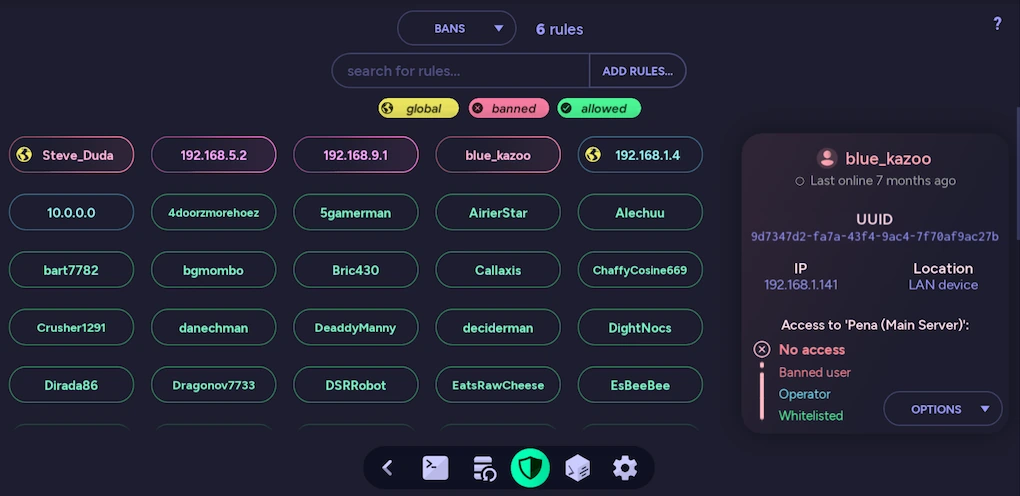
Each listed entry is a rule you can interact with in a few different ways:
- Right-click a rule to view details and more options
- Left-click a rule to toggle permission
- Middle-click to toggle the rule globally
Rules can be filtered with the search bar, and can be added by clicking Add Rules, or pressing Tab⇥Tab. The visible list can be switched between pages from the drop-down above the search bar.
Rule panel
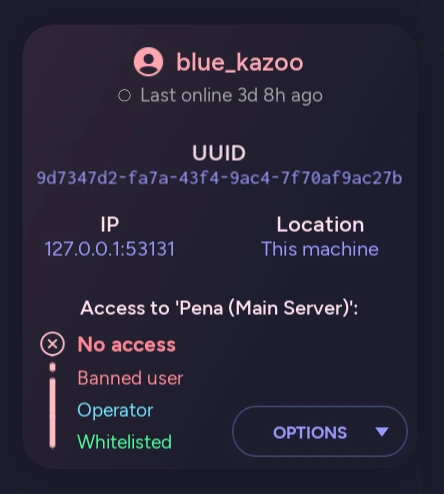
Section titled “Rule panel”It can be difficult to visualize whether a player has access by looking at individual rules. By using Right-click on any rule, the user panel on the right makes it easy to execute sound decisions by clearly displaying if a player has access, and why. You can also see detailed information such as the UUID & IP geolocation.
Global rules
Section titled “Global rules”Additionally, auto-mcs provides a convenient feature — global rules. With global rules, it’s possible to apply any rule to every server with a single click. These rules will sync between all existing servers, and even new or imported servers as well. It’s recommended to add your own username as a global operator for ease of management. Global rules are marked with a yellow globe icon on the left.
For example, you can configure a global whitelist for every server that you’ll ever make, and never have to touch it again!

Automation
Section titled “Automation”The access control functionality of auto-mcs can further be expanded by creating custom behavior with amscript. For example, here’s a script that takes corrective action on players who use excessive profanity:
#!# title: Profanity Filter# author: Kaleb Efflandt# version: 1.0# description: Prohibits the use of a specified word list#!

import requests, re
list_url = 'https://raw.githubusercontent.com/dsojevic/profanity-list/main/en.txt'word_list = requests.get(list_url).content.decode('utf-8', errors='ignore').splitlines()warn = 'word-warning'msg = 'Profanity will not be tolerated!'

# Filter messages based on content@player.on_message(player, message):
    # Check if a prohibited word is in the message    for phrase in word_list:        phrase = phrase.lower().strip()        if re.search(fr'\b{phrase}\b', message.lower()):
            # Issue warning on the first offense            if warn not in player.persistent:                player.persistent[warn] = 0                player.log_warning(msg)
            # Issue a kick on the second offense            elif player.persistent[warn] == 1:                acl.kick_player(player, reason=msg)
            # Issue another warning on the third offense            elif player.persistent[warn] == 2:                player.log_error('Further offense will result in a ban!')
            # Issue a ban on the fourth offense            elif player.persistent[warn] == 3:                acl.ban_player(player, reason=msg)
            player.persistent[warn] += 1            break

# Decrement warning if level 1 or 3@player.on_leave(player, data):
    if warn in player.persistent:        if player.persistent[warn] == 1:            del player.persistent[warn]
        elif player.persistent[warn] >= 3:            player.persistent[warn] = 2