amscript
amscript is a scripting engine built into auto-mcs that lets you design custom commands, react to in-game events, connect external APIs, and automate server management without installing plugins or mods in your server. The amscript engine is based on Python 3.12 and supports extending the functionality with most PyPI packages and custom libraries. It even works in Vanilla!

How it works
Section titled “How it works”amscript runs alongside the server rather than inside the Java process. The engine’s runtime monitors server activity, dispatches asynchronous events, and provides libraries for interacting with players, and the full server backend of auto-mcs. You can programmatically manage everything from the server configuration to individual items in a player’s inventory.
Events cover player activities like connection state, chat, deaths, and advancements; and server activities like the lifecycle, and console output. You can also schedule tasks on a clock, or easily define in-game commands with arguments and permissions. auto-mcs uses amscript itself; its own base library provides several commands to manage auto-mcs in-game.
All of amscript’s functionality is compatible with every server type supported by auto-mcs, on any Minecraft version. The engine handles version differences internally by abstracting things like playerdata and chat formatting, although some features and commands that don’t exist in a particular version may still need special handling. Generally, a single script will be cross-compatible.
See the API Reference for the complete object and event documentation.
Capability Showcase
Section titled “Capability Showcase”There are several useful scripts available to download, you don’t need to be a developer to take advantage of this framework. The amscript library contains scripts you can download, edit, and use as starting points:
| Script | Functionality |
|---|---|
| atmosync | Synchronize in-game time & weather with a real region, including weather alerts |
| Cloud Backup | Synchronize server back-ups to cloud storage with rclone |
| Dynamic Shop | Economy platform with supply-based inflation, a server shop, and wallets |
| Discord Bot | Cross-platform chat and server activity between Minecraft and Discord |
| Welcome Message | Greet players when they join with a customizable banner |
| Custom Waypoints | Save and share locations, and teleport with in-game commands |
| Inventory Loadouts | Store and load snapshots of your inventory using persistent data |
Additionally, there are several other examples for AFK detection, chat moderation, and API integrations. More advanced scripts can access files, web services, and external Python libraries.
Getting Started
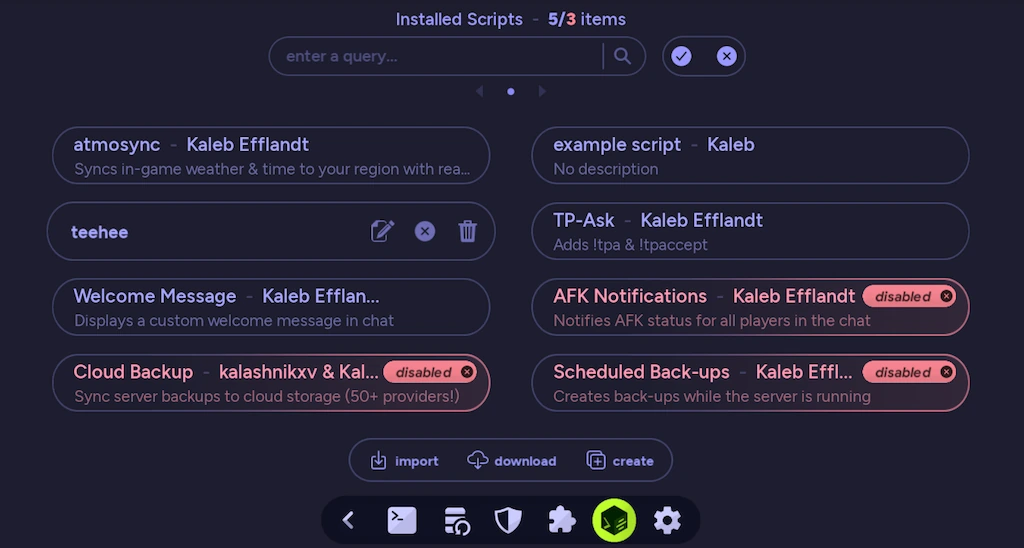
Section titled “Getting Started”Open a server in the Server Manager and select amscript from the taskbar. You can Download scripts from the library, Import existing .ams files, or Create your own in the built-in IDE.
Scripts are installed in a shared directory on each auto-mcs host, and can be enabled or disabled independently for each server. You can also manage and edit scripts on a remote host through Telepath.
See Development for installation, management, and workflow; and Using the IDE for editing and debugging scripts.